Thursday, August 26, 2010
Gigabyte Radeon HD 5770 Passive
Gigabyte release a new graphic card based on ATI Radeon HD 5770. It’s Gigabyte R577SL-1GD with dual slot cooler which able to remove heat without fans.gigabyte-R577SL-1GDGigabyte implement ultra durable design to make silent cooler with 4-heatpipes cooper and composed of several fin arrays and the one is rest on top of the board. Gigabyte HD 5770 has 850 MHz clock speed with 1GB of GDDR5 VRAM (

Asus EEE PC 1015PEM Netbook
ION 2 by NVidia boost the market for netbook and after release EEE PC 1015N now Asus release EEE PC 1015PEM with Intel Atom N550 dual-core 1.5GHz processor. It has 10.1-inch display with 1024×600 pixel resolution, 2GB of RAM DDR3 and 250GB of hard disk drive.asus eee pc 1015pemAlso Asus EEE PC 1015PEM include Intel GMA 3150 integrated graphic card, bluetooth, wifi 802.11 b/g/n, ethernet LAN, 3x
Acer S222HQL, S232HL and S242HL Full HD Monitor
Acer release 3 new LCD monitors with full HD capability. It’s S222HQL, S232HL and S242HL based on Acer S2 Series. The size is 21.5-inches, 23-inches, and 24-inches respectively.acer s242hl monitorThey have ultra thin frame only 13-mm support full HD resolution 1920×1080 pixel, 2ms response time, 250 cd/M2 brightness and 12,000,000:1 dynamic contrast ratio. Acer also using LED backligthing
AdSense Tips explained by Lisa
Lisa Irby is an expert of Blogging and she is also an affiliate marketer. She is running very nice blogs and making money with google adsense. I have watched her channel at youtube and I got inspiration from her lessons she is offering at Youtube. Although she is not offering any training series but just trying to help other people on the internet who got difficulties.
What is the most important thing I learned from her videos is, she is emphasizing on sincerity with your work and your customers or your blog visitors. I advise you to watch this video, you will learn quite a big stuff in a single video related to online earning, blog promotion and google adsense.
Even if you look at this blog post, you will learn, who is Lisa and why I am linking to her blog, website or you-tube video?
Because of quality. Quality of content she is publishing that make people link to her and appreciate her work and recommend her to others. So always be conscious about the quality and be sincere about your content.
Because of quality. Quality of content she is publishing that make people link to her and appreciate her work and recommend her to others. So always be conscious about the quality and be sincere about your content.
Google AdSense tips for new members and people having trouble making money.
Wednesday, August 25, 2010
How to Make the best of NetworkedBlogs
 NetworkedBlogs is basically a Facebook application. It help to promote your blog in many ways. Firstly it uses Facebook platform which is the world's most visited Social Networking website. It has 400 Million active users who send up to 60 million status updates everyday. 3 Billion new photos published everyday and 5 billion pieces of content being shared weekly. An average user spends 55 minutes daily on Facebook. You can see more detailed statics posted by Aden Hepburn at DigitalBuzzBlog. NetworkedBlogs app automatically grab your blog posts once you register your blog into it and then publish your posts to your Facebook Wall, Sydicate it to your twitter account and publish it to any Facebook pages you have created.
Here I am adding a few points that can make you most out of NetworkedBlogs.
Add your blog to NetworkedBlogs directory so others can find it.
Login to your Facebook account, Visit the app's home page and click on button "+ Register a Blog". That will take you to this url.(http://apps.facebook.com/blognetworks/editblog.php). You will find a form with a few fields. Fill it up with your blog details. Name, URL, Language, Tags and Description, please note that you have to provide a valid RSS/Atom feed then and click next. You will be asked "Are you the author of this blog".
If you click on YES and you are the real author of this blog, you have to varify it. You have 2 options to do that.
- Ask from your friends (10 Friends must approve you as a blog owner)
- Use NetworkedBlogs widget to verify it. (You need to put a specific code into blog home page)
You can simply skip this step by clicking on "do it later" link or continue verifying your blog. (Recommended). That's done.
 Import your feed and push it to the stream for all your friends and fans to see.
This is one of the best ways to promote your blog. Make sure your posts show on your wall and in the news feed of your friends and fans. NetworkedBlogs provides several options to do that. On your blog page, click "Syndication" to enable this feature. And if you have a Facebook page, you can use this feature too through your page's 'edit page' menu. Whenever a new post is publishd at your blog it will automatically published to your wall and it will look like this.

Invite your friends to follow your blogs.
 Your friends most likely want to follow your news and read what you write. On yor blog page, click "invite friends to follow".
Add the NetworkedBlogs tab to your profile
Do that from your Facebook profile page as shown below.
Add the NetworkedBlogs widget to your blog.
The widget will allow your readers to follow your blog directly from your blog.

Use the news reader on the app's home page.
Use it to find the latest news, and make sure to vote the good posts up. When you vote on a post, your picture will show next to that post for everyone else to see. You help the best posts get exposure, and people tend to click on pictures of those who recommend good articles to see what else they're up to and might choose to follow your blog as well.
Google Finance smartens up for your smartphone
(Cross-posted from the Google Finance blog)
We heard your feedback and are please to announce we’ve launched the new Android/iPhone edition of Google Finance for mobile! The markets don’t stop when you leave your desk, so we’re bringing the markets to you. Our new design gives you a unified experience across desktop and Android or iPhone phones, offering nearly all the same features and functionality on both. You can easily access the new site when you do a Google search for stock tickers or company names on your mobile device, or when you tap the "Finance" tab on the Google mobile homepage.


Prefer it in app form? Android users can also get the Google Finance app in Android Market.
As always, if you have feedback on this or other topics, please share it on our Google Finance survey or visit our Product Ideas site where you can share and vote on ideas.
For more tips and tricks on Google Finance, follow us on Twitter.
Posted by Brian Shih, Product Manager
Tuesday, August 24, 2010
Buy from Souq.com with your Mobily Neqaty points
Mobily in its incessant efforts to offer enhanced customer experience, inked a strategic deal with Souq.com. The renowned on-line marketplace site via its Neqaty loyalty platform. Now, users of Neqaty; deemed the best loyalty program in the region, can use their accumulated points to make purchases on Souq.com.
“Our partnership with the Arab world’s best e-commerce site through our Neqaty program will offer choice and ease of use to our mutual customers while giving a boost to the retail market,” said David Murphy, Mobily’s Chief Marketing Officer. “The deal will help Mobily’s subscribers use their points as good as cash on Souq.com and buy what they need. Souq.com features various offers as E-shopping is the a growing trend, which is why we wanted to give our clients added value and new features.”
Abbass Safadieh, General Manager of Souq.com in Saudi Arabia, put the retail e-market at SAR 3 billion, or a fifth of the Kingdom’s overall e-trade market. Likewise, retail e-traders comprise one fifth of the overall e-trading population.
He said that the deal will boost demand for e-commerce in the Kingdom. “We are happy to have become a strategic partner to Mobily,” he said. “We look forward to a special, fruitful partnership that sees our experience in e-commerce at the fingertips of Mobily’s subscribers.
We invite them to visit our site and register to make purchases, especially that souq.com helps thousands of buyers to communicate daily and trade various goods, all under a secure infrastructure with payment methods that meet the needs of local users.
“Our partnership with the Arab world’s best e-commerce site through our Neqaty program will offer choice and ease of use to our mutual customers while giving a boost to the retail market,” said David Murphy, Mobily’s Chief Marketing Officer. “The deal will help Mobily’s subscribers use their points as good as cash on Souq.com and buy what they need. Souq.com features various offers as E-shopping is the a growing trend, which is why we wanted to give our clients added value and new features.”
Abbass Safadieh, General Manager of Souq.com in Saudi Arabia, put the retail e-market at SAR 3 billion, or a fifth of the Kingdom’s overall e-trade market. Likewise, retail e-traders comprise one fifth of the overall e-trading population.
He said that the deal will boost demand for e-commerce in the Kingdom. “We are happy to have become a strategic partner to Mobily,” he said. “We look forward to a special, fruitful partnership that sees our experience in e-commerce at the fingertips of Mobily’s subscribers.
We invite them to visit our site and register to make purchases, especially that souq.com helps thousands of buyers to communicate daily and trade various goods, all under a secure infrastructure with payment methods that meet the needs of local users.
Dive into the ocean with Google Earth for Android
Especially during the summer months, staring out into the ocean leads to daydreams of sailing the open water, freedom and exploration. Now you can take three-quarters of this vast planet - the ocean - with you on your mobile device by downloading the new Google Earth 1.1 for Android.
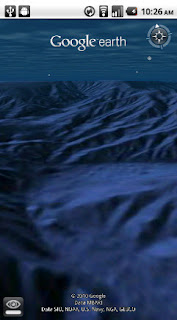
With the release of this feature, escape the hustle and bustle of life on land and discover the marine world using Google Earth on your mobile device. Now, you can check out the landscape and terrain in Monterery Bay Canyon, which is larger than the Grand Canyon, by zooming in on Google Earth below the ocean surface just off the coast. Once underwater, we can use the “look around” button to tilt the view and see the extent of this great undersea canyon.
The latest version of Google Earth for Android also introduces the “Explore the Ocean” layer, which features hundreds of photos and videos from more than 100 contributors who are excited to share their stories of sea. Plan your next vacation during your daily commute by clicking on any of the little blue icons. The gold highlighted icons represent content from the Mission Blue Hope Spot initiative.
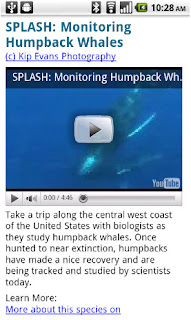
Google Earth for Android 1.1 is available in Android Market today for most Android devices running version 2.1 or later. Explore the ocean anywhere.

Posted by Jenifer Austin Foulkes, Product Manager
Google Mobile App for iPhone gets pushy
Ever missed an appointment or important email because you were away from your desk? Now Google Mobile App can help with push notifications from your Google account to your iPhone -- an icon badge shows you’ve got new mail in Gmail, and Google Calendar event reminders appear right on your home screen.


If you have any questions or comments, or if you want to learn more, please visit our help center.


We’ve also added spiffy features to get you information faster -- when looking for flight info, weather, stock quotes or currency conversion you’ll see answers before you even hit ‘Search’.

You can get the update from the App Store by searching for ‘Google Mobile App’.
Update 8/24 5:00 PM PST:
- You will only receive pop-up messages and sound/vibration for calendar alerts - new email is shown using the unread count on the Google Mobile App icon and in the apps tab.
- To ensure you get alerts go to the Settings > Google Accounts panel inside Google Mobile App and switch on the notifications you'd like to receive. If you initially didn't allow Google Mobile App to receive push notifications when prompted, you can enable the feature again in the iOS Settings' application's Notifications panel.
Friday, August 20, 2010
Ban on BlackBerry services will not be implemented in KSA

Reuters now cites a source familiar with the talks between the CITC, RIM and the operators as saying that the idea of setting up a server at each of the three local service providers has proved impractical, and that in place RIM has agreed to offer Saudi Arabia's interior ministry and intelligence services the codes to all Saudi BlackBerry users.

The CITC was not available for comment, while RIM referred to an earlier statement that "RIM cooperates with all governments with a consistent standard".
Source
How to Transfer STC Qitaf points to your loved ones
 Qitaf is a free service from STC (Saudi Telecom Company) which offers several benifits on using your mobile phone.
Transfer STC Qitaf points to your loved ones
Transfer points from your Qitaf account to your loved ones today, by calling 902/907. After that you will be able to redeem the points for one of STC’s services. If your balance reaches 500 or more points, you will be eligible for one Qitaf voucher. You will be able to enjoy shopping and other benefits from STC Qitaf points.Transferring Rules
- Maximum 100 points per month can be transferred to another Qitaf member
- Transfers can be made in increments of 20 points
- Recipients may receive from other Qitaf subscribers, up to 300 transfer points per month
General Terms
In order to transfer points, you must be the primary account holder. STC may at any time and without prior notice- Terminate the points transfer service in its entirety
- Change, limit or terminate any aspect of the service
More details may be seen at STC Website
To 100 million and beyond with Google Maps for mobile
Almost five years ago, we launched Google Maps for mobile to help you get where you needed to go from your phone instead of a paper map. Today, more than 100 million people a month are now using Google Maps for mobile to get from point A to point B, find nearby places, and more.
Over the past five years, Maps for mobile has changed quite a bit, adding more ways to help you explore the world around you. With My Location, you can quickly find where you are on the map with or without GPS. You can put your friends on the map with Latitude. Navigation even turns your phone into a free internet-connected navigation system with voice guidance and Street View imagery.

Google Maps for mobile through the years (click to see larger image).
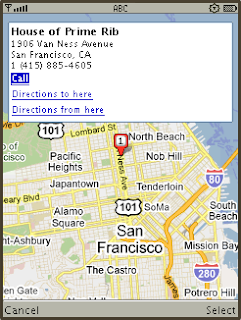
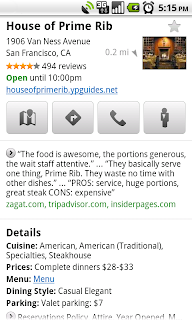
Search result page for Java-enabled phones in 2005 (left) and Place Page for Android-powered devices in 2010 (right).
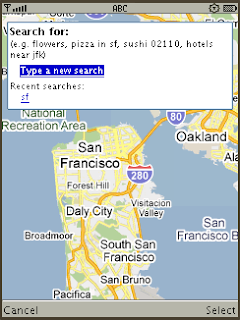
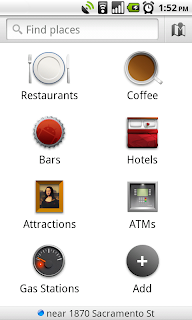
Search experience in 2005 (left) and Places for Android-powered devices in 2010 (right).
We hope this is just the start of how Google Maps for mobile will continue to evolve and let you explore the world right from your phone. We’re always inspired by how you’re using Maps, and we’d love to hear about a time when you found the nearest mechanic for a flat tire or discovered that hidden gem of a burger joint. If you have a Google story about when Maps for mobile has helped you, please tell us about it. You can also share quick stories on Twitter @googlemobile, and we’ll share our favorite ones. From all of us here on the Google Maps for mobile team, 100 million thank yous for getting your Google Maps to go!
If you’re a business owner, help millions of people find you by claiming your free Place Page available in Google Maps and our most used mobile “app” -- Google Search. Get started at places.google.com/businesses.
Over the past five years, Maps for mobile has changed quite a bit, adding more ways to help you explore the world around you. With My Location, you can quickly find where you are on the map with or without GPS. You can put your friends on the map with Latitude. Navigation even turns your phone into a free internet-connected navigation system with voice guidance and Street View imagery.

Google Maps for mobile through the years (click to see larger image).
Lately, we’ve been especially focused on helping you find the right place at the right time. With recent additions such as Place Pages, you can now pick a nearby place by browsing information such as opening hours and review snippets for the places around you. It’s easier than ever to find those places with Search by voice or the new Places icon on Android. With this latest Android version, we’re happy to see that you’re now searching for places almost three times as often, doubling how many Place Pages are seen a day.


Search result page for Java-enabled phones in 2005 (left) and Place Page for Android-powered devices in 2010 (right).


Search experience in 2005 (left) and Places for Android-powered devices in 2010 (right).
We hope this is just the start of how Google Maps for mobile will continue to evolve and let you explore the world right from your phone. We’re always inspired by how you’re using Maps, and we’d love to hear about a time when you found the nearest mechanic for a flat tire or discovered that hidden gem of a burger joint. If you have a Google story about when Maps for mobile has helped you, please tell us about it. You can also share quick stories on Twitter @googlemobile, and we’ll share our favorite ones. From all of us here on the Google Maps for mobile team, 100 million thank yous for getting your Google Maps to go!
If you’re a business owner, help millions of people find you by claiming your free Place Page available in Google Maps and our most used mobile “app” -- Google Search. Get started at places.google.com/businesses.
Mobily planned to launch iPhone4 in Saudi Arabia
 Mobily, a leading Mobile operator in Saudi Arabia who is earning high profits in 2010 has planned to launch famous and fabulous iPhone, the iPhone 4 in Saudi Arabia. iPhone 4 is the most versatile smartphone by apple which has beaten many other phones of its era like BlackBerry and HTC models.
Mobily will launch iPhone 4, the thinnest Smartphone in the world with the highest resolution display ever built into a phone, in the Kingdom of Saudi Arabia in the coming months.
The launch is part of Mobily’s new strategy to enrich the lives of its clients with innovative products and progressive initiatives. The company’s vast infrastructure guaranteed it undisputed leadership in broadband in the entire region.
More can be found here.
http://bit.ly/mobily-iphone4
3 Google Adsense Optimization tips by Videos
Bigger is better
Bigger ad sizes for adsense perform well.
Dress for success
Position for performance
put your Google ads onto most prominent places where users can see it.
Thursday, August 19, 2010
The Iterative Web App: New Stacked Cards Interface for Gmail on iPad.
In April 2009, we announced a new version of Gmail for mobile for iOS and Android. Among the improvements was a complete redesign of the web application's underlying code, which allows us to more rapidly develop and release new features that users have been asking for, as explained in our first post. Today’s topic for the The Iterative Web App, a series where we continue to release features for Gmail for mobile, is the Stacked Cards Interface on the iPad.
When we announced our new interface for Gmail on the iPad, we requested feedback on how we could improve this experience for tablet devices. In June, we responded with a new compose screen. Today, we’re addressing the top feedback by launching a new “stacked card” interface for selecting and managing multiple conversations.

In the past, performing actions on selected conversations was awkward. There were two similar toolbars on the screen: one on the bottom left and the other on the top right. The former affected the selected conversations, while the latter affected the currently open conversation. Since the toolbars’ buttons looked similar, it was easy to mistakenly use the wrong toolbar. Sound confusing? It was.
In the new interface, selected conversations are displayed stacked on the right panel for easy organizing, archiving or deleting. The second toolbar is gone so it’s always clear which conversations you’re working with.
This new interface has also been an opportunity for our team to experiment with CSS3 transitions, which give mobile web applications a similar look and feel to native applications. More details on the implementation are posted on the code blog.
To try the Gmail webapp on the iPad, just go to gmail.com in Safari. For quick access, create a homescreen link. Please note that the new interface is only available in US English for now.
When we announced our new interface for Gmail on the iPad, we requested feedback on how we could improve this experience for tablet devices. In June, we responded with a new compose screen. Today, we’re addressing the top feedback by launching a new “stacked card” interface for selecting and managing multiple conversations.

In the past, performing actions on selected conversations was awkward. There were two similar toolbars on the screen: one on the bottom left and the other on the top right. The former affected the selected conversations, while the latter affected the currently open conversation. Since the toolbars’ buttons looked similar, it was easy to mistakenly use the wrong toolbar. Sound confusing? It was.
In the new interface, selected conversations are displayed stacked on the right panel for easy organizing, archiving or deleting. The second toolbar is gone so it’s always clear which conversations you’re working with.
This new interface has also been an opportunity for our team to experiment with CSS3 transitions, which give mobile web applications a similar look and feel to native applications. More details on the implementation are posted on the code blog.
To try the Gmail webapp on the iPad, just go to gmail.com in Safari. For quick access, create a homescreen link. Please note that the new interface is only available in US English for now.
Subscribe to:
Posts (Atom)